
I bought the domain, set up WordPress on hosting, enabled SSL, and slightly improved the content. To be honest, there’s still a healthy amount of lorem ipsum hanging around, but that’s not the main focus right now. What really matters at this stage is checking how the site performs technically.
Why test the site’s speed early on?
Speed isn’t just a nice-to-have anymore. A slow website can kill your rankings, frustrate visitors, and send them running to your competitors faster than you can say “bounce rate.” Google’s Core Web Vitals heavily favor pages that load quickly, especially on mobile. Since more than 60% of traffic is mobile these days, ignoring speed is like opening a shop but keeping the door half-closed.
First technical check – no tweaks yet
I ran the site through several speed-testing tools with a focus on mobile performance. The result? Surprisingly strong, even though I haven’t touched any technical optimization yet. That’s a good sign – it means the theme itself is lightweight and well-built, which gives us a great starting point for future improvements.
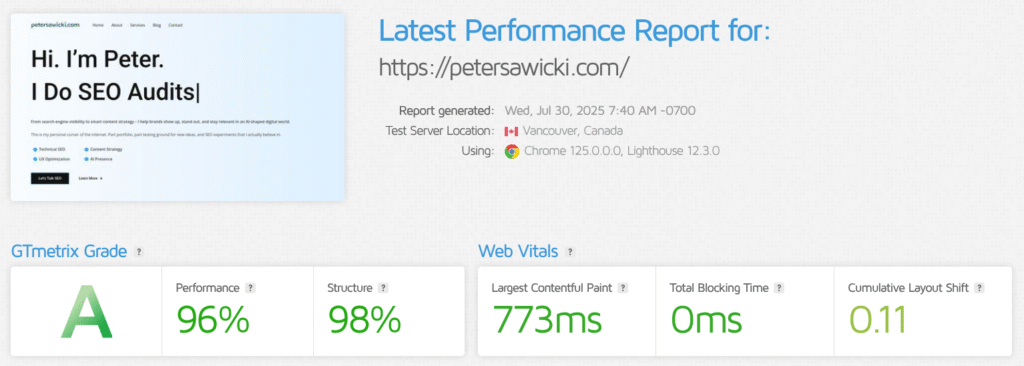
Green scores don’t mean perfection
Even with mostly green results, there’s still room to improve. We can trim some scripts, optimize image loading, and fine-tune caching to make it even snappier. But we’ll tackle those in the next step. For now, it’s enough to know that the foundations are solid and the site is already performing better than many finished websites out there.
My Favorite Tool for Speed Testing
When it comes to testing site performance, my go-to tool is GTMetrix. It doesn’t just tell me what’s good or bad on the page. My favorite part is the Waterfall Chart. This little gem lays out every single element the site is trying to load.
That’s where you often catch the hidden culprits slowing things down – the stuff you can’t see on the surface. For example, sometimes the browser is forced to wait for files hosted on a third-party server. In some cases, these files don’t even exist anymore, yet the site is still trying to fetch them. This kind of delay blocks rendering and directly hurts your speed scores.
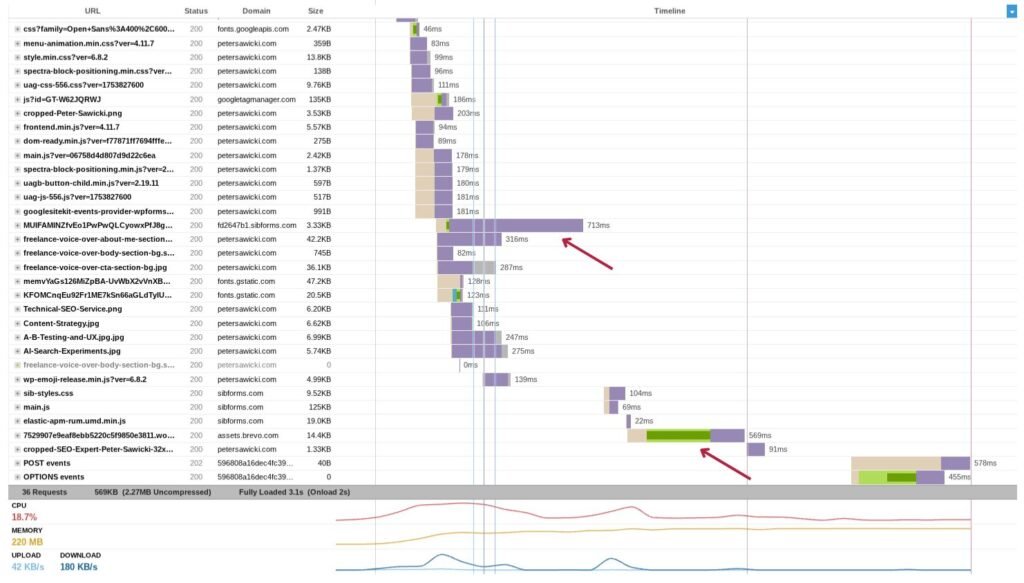
At first glance, everything might look fine, but the Waterfall Chart lays it all out on a platter, making it obvious where we can cut dead weight and make the site lightning-fast. Here on my own site, I can already spot at least two elements that need a closer look to see if we can trim down their loading time. These are scripts loaded from a third-party server, and later we’ll check if we can either remove them from the homepage or host them locally instead.
Using Google PageSpeed Insights
Another tool I always use is Google’s PageSpeed Insights. This one is much pickier – it’s rarely ever fully satisfied with any site. Even if you think your page is lightning-fast, PageSpeed Insights will find something to complain about, which actually makes it a great benchmark for spotting hidden issues.
The big advantage of this tool is that it runs separate tests for mobile and desktop. This is crucial because having a perfectly “green” desktop score doesn’t mean your mobile performance is equally strong. And as we all know, mobile-first is what truly matters in today’s SEO game.
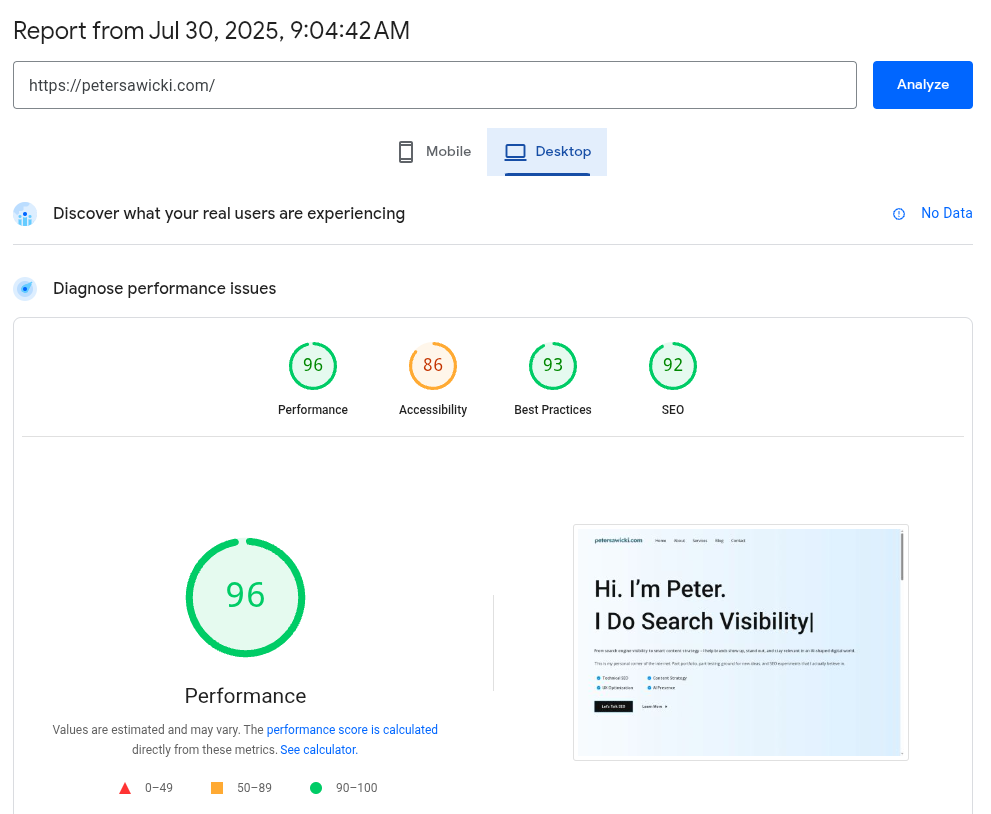
Not Perfect, But a Solid Starting Point
It’s definitely not perfect, but it’s far from bad. Just as I’ve seen hundreds of times before, the desktop version scores better than mobile. That’s completely normal, especially at this stage. Remember, we haven’t done any optimization yet – the whole point of this check is simply to see our true starting point before we begin making technical improvements.
Why Starting with a Technical Analysis Makes Sense
Sometimes it’s best to begin with a deep technical analysis because physical infrastructure can fail, and errors sneak in where you least expect them. A while back, I worked on a website that had a 7-second loading time – yes, you read that right! Everything looked fine on the surface, yet the page loaded painfully slow.
When I ran a technical check, it turned out the server response time alone was over 6 seconds. But that wasn’t the end of the story. The hosting provider, of course, claimed that everything on their side was perfectly fine and that it had to be a problem with our website – suspicious scripts, bad code, or even a virus. Classic blame-shifting.
So, what did I do? I set up a completely fresh WordPress – no themes, no plugins, nothing fancy. A clean site like that should’ve loaded in the blink of an eye… but nope, it crawled just as slowly as before. That’s when the hosting provider finally admitted, “Yeah, maybe something is wrong on our side,” though they still couldn’t explain what.
We moved the site to a new hosting company, and suddenly it was like flipping a switch – fast, smooth, and working exactly the way it should have from the start. Moments like this are a good reminder of why I always start with a technical analysis. It saves you from wasting hours “optimizing” something that’s broken at the foundation.

Written by Peter Sawicki, an experienced strategist with a background spanning multiple industries, from private enterprises to government projects. Having worked across different countries and markets, I bring a global perspective and practical insights to every SEO strategy I design. As a diver and adventure seeker, I’ve learned to balance attention to detail with a drive to explore new solutions, a mix that shapes both my work and my life.