

Google Search Console is free. It is also the most underused tool in tourism SEO. Most destination marketers check their total clicks once a month, maybe glance at top queries, and call it a day. That approach leaves massive opportunities on the table.
After auditing numerous tourism websites, I can confirm that operators who actively use GSC outperform those who just have it installed by 30-40% in organic traffic. This guide covers the advanced features that matter specifically for tourism sites, from international targeting to the link signals that Google actually cares about.
Performance Reports: Beyond Basic Metrics
The Performance report is where most people start and stop. They look at total clicks, maybe filter by page, and move on. Here is how to actually extract value from this data for a tourism website.

Query Analysis for Seasonal Planning
Tourism is seasonal. Your GSC data reflects this, but you need to know how to read it. Compare date ranges year-over-year, not month-over-month. A 20% drop in February clicks means nothing if February is always your slowest month.
Filter by queries containing seasonal modifiers: “summer,” “winter,” “christmas,” “spring break.” Export this data for your top 50 pages and map it against your content calendar. When I did this for a Caribbean dive operation, we discovered our “rainy season diving” content was getting searched heavily in May, but we had been publishing it in September when bookings were already made.

CTR Optimization by Query Intent
Your average CTR across all queries is meaningless. What matters is CTR by query type. Branded queries should hit 40%+ CTR in position 1. If they do not, you have a brand reputation problem or your SERP listing looks wrong.
Informational queries (“best time to visit Costa Rica”) typically see 15-25% CTR in position 1. Transactional queries (“book scuba diving Guanacaste”) should hit 20-30% in top positions. If your transactional CTRs are below 15%, your meta descriptions are failing to convert searchers.
Create a custom regex filter in GSC for queries containing booking intent words: book, reserve, price, cost, tour, package. Track this segment separately from your informational content. Different benchmarks, different optimization strategies.
Search Appearance: Rich Results That Drive Bookings
The Search Appearance section tells you which rich result types are showing for your pages. For tourism sites, this is critical because rich results directly impact click-through rates and, increasingly, AI visibility.
FAQ Rich Results
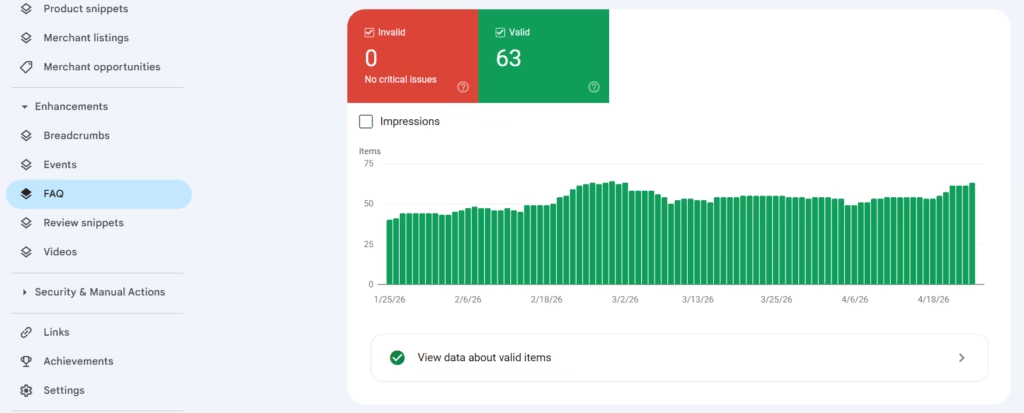
If you have FAQ schema implemented and you are not seeing FAQ appearances in GSC, something is broken. Either the schema is invalid, Google is not trusting it, or your content quality is too low. Check the Rich Results Test tool to validate your markup, then monitor the Search Appearance report to confirm Google is actually displaying it.
I worked with a hotel group that had FAQ schema on 200+ pages but only 12 were showing FAQ rich results. The issue: they were using FAQ schema for promotional content rather than actual questions. Google’s algorithms are smart enough to detect this pattern. We rewrote the FAQs to address genuine searcher questions and saw FAQ appearances jump to 140+ pages within two months.
Event Rich Results for Tourism
If you promote local events, festivals, or seasonal activities, Event schema should generate appearances in the Search Appearance report. Events that do not show up here are likely missing required fields or have date formatting issues.
Common tourism-specific problem: recurring events with incorrect date ranges. A weekly sunset cruise should use startDate and endDate for the specific occurrence, not a year-long range. GSC will show you if events are being recognized or ignored.
Review Snippets and Ratings
For tour operators and accommodations, review rich results are conversion drivers. The Search Appearance report shows if your LocalBusiness or Product schema is generating review snippets. If you have reviews on your site and they are not appearing as rich results, check your schema for aggregateRating implementation.
Important: Google has become stricter about self-hosted review schema. If you are only showing reviews collected on your own site, you may not qualify for review snippets. Integration with third-party review platforms (TripAdvisor, Google Business Profile) strengthens your eligibility.
Core Web Vitals: What Actually Matters for Tourism Sites
The Core Web Vitals report in GSC shows field data from real users. This is different from lab data in PageSpeed Insights. For tourism sites with global audiences, field data often tells a very different story than lab tests run from US servers.
Mobile Experience for International Visitors
Filter your Core Web Vitals report by mobile only. This is your reality. Most tourism searches happen on mobile devices, often on slower connections. A site that passes lab tests but fails field data has a real problem, not a testing artifact.
Tourism sites have unique CWV challenges: large hero images, embedded booking widgets, map integrations, video backgrounds. Each of these can tank your Largest Contentful Paint score. The GSC report shows which specific URL groups are failing, so you can prioritize fixes.
When I audited a destination marketing organization’s website, their homepage passed lab tests at 2.1 seconds LCP. Field data showed 4.8 seconds. The difference: lab tests do not account for third-party booking widget load times that real users experience. We lazy-loaded the booking widget below the fold and field LCP dropped to 2.4 seconds within six weeks.
Interaction to Next Paint for Booking Flows
INP replaced First Input Delay in 2024. This metric matters more for tourism sites because booking flows involve multiple interactions: date pickers, guest selectors, room filters. Each interaction that causes visible lag hurts your INP score.
GSC shows INP at the URL group level. If your /book/ or /reserve/ URL groups have poor INP scores, you are losing conversions. Users expect instant response when selecting travel dates. A 300ms delay feels broken.

Cumulative Layout Shift on Image-Heavy Pages
Tourism sites rely on photography. Destination pages, property galleries, activity showcases: all image-heavy, all prone to CLS issues. The GSC report identifies which page groups have CLS problems.
Common culprits: images without width and height attributes, lazy-loaded images that shift content, cookie consent banners that push content down. Fix width and height attributes first because this single change often resolves 60%+ of CLS issues.
International Targeting: Hreflang Validation
If you have multilingual content or country-specific versions of your tourism site, the International Targeting report is essential. GSC is the only place to see if Google is correctly interpreting your hreflang implementation.
Reading the Hreflang Tags Report
Navigate to Legacy tools and reports, then International Targeting. The Language tab shows detected hreflang annotations and any errors. Common errors for tourism sites include:
Missing return links: Your English page points to Spanish, but Spanish does not point back to English. Google ignores one-way hreflang declarations. Missing self-referential tags: Each page should include hreflang pointing to itself.
Many tourism sites skip this, causing Google to question the validity of all hreflang signals. Incorrect language codes: Using “en-UK” instead of “en-GB” or “es-LA” (invalid) instead of “es-419” for Latin American Spanish.
I have seen tourism sites with 300+ hreflang errors in GSC that had no idea because they never checked this report. One DMO was targeting German visitors but using “ge” (Georgian) instead of “de” (German) as the language code. They wondered why German organic traffic was flat despite creating dedicated German content.
Country Targeting for ccTLD and Subdirectory Structures
If you use subdirectories (/es/, /de/, /fr/) or subdomains for different markets, GSC treats each as part of the same property. You can set geographic targets at the property level for generic TLDs.
For tourism sites targeting specific markets, this setting can improve relevance signals. A Costa Rica tour operator with a .com domain can set country targeting to Costa Rica to strengthen local signals, or leave it unset to maintain global visibility. The right choice depends on your business model.
Links Report: What Google Actually Values
The Links report shows your top linking sites, top linked pages, and top linking text. For tourism SEO, this data reveals your true competitive position better than third-party tools.
Top Linking Sites Analysis
Export your top linking sites and categorize them: travel media, local directories, government tourism sites, travel blogs, general news, irrelevant or spammy. The distribution tells you about your link profile health.
Healthy tourism link profiles typically show: 15-25% travel media and publications, 10-20% local and regional directories, 10-15% tourism authority sites (official DMO sites, national tourism boards), 20-30% travel blogs and content sites, 10-15% news mentions, 10-20% other relevant sites.
If your link profile is 60%+ directories or 40%+ exact-match anchor links, you have a risk profile that could trigger manual review.
Top Linked Pages vs. Important Pages
Compare your top linked pages (Links report) against your highest-value pages (revenue drivers). Misalignment here is common for tourism sites. Your blog post about “10 beaches in Bali” has 500 referring domains. Your actual Bali tour booking page has 12.
This misalignment signals a content and internal linking opportunity. Use that well-linked blog post to pass authority to commercial pages through strategic internal linking. GSC shows you where the equity is, you decide where it should flow.
Anchor Text Distribution
The “Top linking text” section reveals how other sites describe you. For tourism brands, this should be varied: your brand name, descriptive phrases (“Costa Rica diving experts”), natural variations (“this tour company”), and relevant keywords.
Red flags: heavy concentration of exact-match keywords, which suggests manipulative link building, or generic anchors (“click here”) dominating, which suggests low-quality directory links.
Manual Actions and Security Issues
These reports should always show zero issues. If they do not, everything else in this guide is secondary until you resolve them.
Manual Actions for Tourism Sites
Common manual actions affecting tourism sites: thin content with little added value (auto-generated location pages), unnatural links to your site (paid link schemes), and user-generated spam (forum or review sections with spammy content).
I consulted for a tour aggregator that received a “thin content” manual action. They had generated 3,000+ location pages with only slight variations in city names, no unique content. The fix required either adding substantial unique content to each page or noindexing pages that could not be differentiated. They chose to noindex 2,400 pages and properly develop 600. The manual action was lifted after reconsideration request.
Security Issues
Tourism sites are high-value targets for hackers because they often process payments and collect personal data. The Security Issues report shows if Google has detected malware, hacked content, or other security problems.
Check this report weekly. A hacked tourism site loses bookings immediately, and Google’s malware warnings can destroy trust that took years to build.
URL Inspection and Index Coverage
Individual URL inspection reveals exactly how Google sees any page on your site. For tourism sites with complex URL structures, this tool is invaluable for debugging indexing issues.
Inspecting Booking and Filter URLs
Tourism sites generate URLs through booking widgets, filter combinations, and parameter strings. Many of these should not be indexed. Use URL Inspection to verify that your canonical tags and noindex directives are working correctly.
Enter a URL like /tours/?destination=costa-rica&activity=diving&price=low-high and check: Is it indexed? What canonical does Google detect? Is there a robots directive? Filter and faceted navigation pages that get indexed create duplicate content and crawl budget waste.
Coverage Report for Large Tourism Sites
The Index Coverage report (now called Pages) shows how many URLs are indexed, excluded, and errored. For tourism sites, key areas to monitor include:
- Excluded by noindex: This should include intentionally noindexed pages like booking confirmations, user accounts, and filtered URLs. If important pages appear here, you have a configuration error.
- Crawled but not indexed: Google found these pages but chose not to index them. For tourism sites, this often includes thin location pages, duplicate property descriptions, or low-value category pages. This is Google telling you the content is not worth indexing.
- Duplicate without user-selected canonical: Google found multiple versions of a page and chose its own canonical because your signals were unclear. Fix your canonical tags.
Sitemaps and Crawl Stats
Sitemap Submission and Monitoring
Submit separate sitemaps for different content types: main pages, blog posts, images, videos. For large tourism sites, breaking sitemaps by content type makes it easier to identify indexing issues.
The Sitemaps report shows coverage, indexing rate, and any sitemap errors. A sitemap with 1,000 URLs but only 200 indexed pages signals a content quality or technical problem that needs investigation.
Crawl Stats for Budget Optimization
The Crawl Stats report (Settings > Crawl stats) shows how Googlebot interacts with your site. For tourism sites with thousands of pages, this reveals crawl budget allocation.
Check: Total crawl requests per day, average response time, and response codes. If Google is spending crawl budget on 404 pages, redirects, or parameterized URLs, you are wasting limited resources.
Frequently Asked Questions
How often should I check Google Search Console for a tourism site?
Weekly at minimum for performance trends, monthly for deep analysis. Set up email alerts for security issues and manual actions so you catch critical problems immediately. Seasonal tourism businesses should check daily during peak booking periods because ranking fluctuations during high season cost real revenue.
Why does my GSC data not match my analytics?
GSC shows Google Search clicks based on Google’s sampling and filtering. Google Analytics shows actual sessions from all sources. Expect a 10-20% variance. GSC excludes certain queries for privacy, rounds data, and reports on click events rather than sessions. Use GSC for search performance trends, analytics for user behavior.
How do I fix pages marked as “Crawled but not indexed”?
First, evaluate if the page should be indexed. Many pages in this category are genuinely thin or duplicative. If the page has value, improve content depth, add internal links pointing to it, and ensure it appears in your sitemap. Request indexing after improvements. Google may still decline to index if the content does not meet quality thresholds.
Should I remove old seasonal content from my tourism site?
Usually no. Update it instead. A page about “Christmas Markets in Prague 2023” has existing authority and links. Update to 2024, add new information, and the URL retains its SEO value. Removing and creating new URLs every year resets your authority. Use GSC to identify which seasonal pages have earned links and rankings worth preserving.
How do I use GSC data to prioritize content updates for my tourism site?
Filter the Performance report for pages ranking positions 5-15 with high impressions. These pages are visible but not clicking. Improving content and on-page optimization for these can deliver quick ranking gains. Also identify pages with declining clicks year-over-year because they may need content refreshes or have been outcompeted.
What GSC metrics matter most for tourism SEO specifically?
Mobile performance data because tourism searches are overwhelmingly mobile, international targeting validation because tourism serves global audiences, and branded vs. non-branded query split because this reveals true organic visibility beyond brand recognition. The ratio of commercial queries (containing “book,” “tour,” “price”) to informational queries shows how well you are capturing booking intent.
Google Search Console is not glamorous. It will not give you viral content ideas or tell you what your competitors are doing. What it will do is show you exactly how Google sees your tourism site, where the problems are, and whether your fixes are working. That direct line to Google’s perception is worth more than any third-party tool estimate.
If you need help interpreting your GSC data or building an SEO strategy around what the data reveals, get in touch for a consultation.

About the Author
I’m Peter Sawicki, a Destination SEO Strategist helping tourism brands and DMOs grow their online presence through SEO, technical audits, and creative digital strategies. Over the years I’ve worked across multiple countries and markets, which gives me a global perspective on every project I take on. When I’m not optimizing websites, you’ll most likely find me underwater. Scuba diving is where my two biggest passions meet.