

Your hotel website loads like molasses, images jump around while guests try to book, and that reservation form freezes right when someone clicks “Book Now.” Sound familiar? You’re failing Core Web Vitals, and it’s costing you direct bookings.
I’ve audited dozens of hotel websites over the past three years, and the same issues pop up everywhere: massive hero images that take forever to load, booking widgets that cause layout shifts, and interactive elements that don’t respond when clicked. The good news? These problems are fixable with the right approach.
What Are Core Web Vitals for Hotel Websites
Core Web Vitals measure three specific aspects of user experience that directly impact your hotel’s conversion rates. Google uses these metrics as ranking factors, but more importantly, they determine whether potential guests abandon your site or complete a booking.
Largest Contentful Paint (LCP): Loading Speed
LCP measures how long it takes for the largest visible element on your page to load. For hotel websites, this is usually your hero image or booking widget. Google wants this under 2.5 seconds, but I recommend targeting 2.0 seconds or better.
Last month, I worked with a boutique hotel in Barcelona whose homepage LCP was 4.8 seconds. Their hero carousel with five 2MB images was killing performance. We replaced it with a single optimized image and saw LCP drop to 1.9 seconds. Their bounce rate decreased by 23% within two weeks.
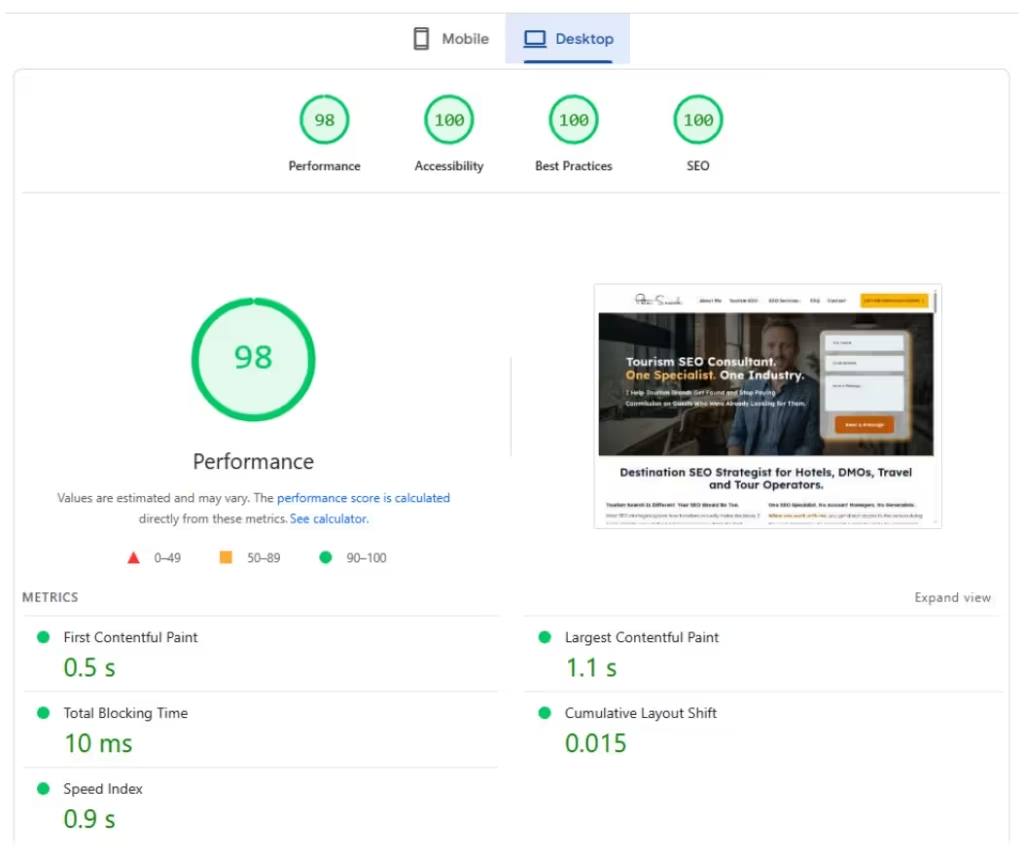
Cumulative Layout Shift (CLS): Visual Stability
CLS tracks unexpected layout shifts that happen while your page loads. You know that frustrating moment when you’re about to click a button and the page jumps? That’s a layout shift, and it destroys user experience.
Hotel websites are notorious for this. Booking widgets load after the page, pushing content down. Image galleries resize as photos load. Third-party review widgets appear suddenly. Google wants your CLS score below 0.1.
Interaction to Next Paint (INP): Responsiveness
INP replaced First Input Delay in March 2024 and measures how quickly your page responds to user interactions throughout the entire visit. When someone clicks your “Check Availability” button, how long before something happens? Google wants this under 200 milliseconds.
Complex booking engines and heavy JavaScript frameworks often cause poor INP scores. I’ve seen hotel sites where clicking the date picker takes 800ms to respond. That’s four times Google’s threshold.
Common Core Web Vitals Issues on Hotel Websites
Image Problems That Kill LCP
Hotel websites are image-heavy by nature, but most handle photos terribly. Here’s what I see repeatedly:
- Unoptimized hero images: A 5MB JPEG of your hotel facade might look stunning, but it destroys LCP. Use WebP format and compress images to 200-400KB without visible quality loss.
- Missing image dimensions: When you don’t specify width and height attributes, images cause layout shifts as they load. Always include dimensions in your HTML.
- Poor lazy loading implementation: Lazy loading your above-the-fold hero image actually hurts performance. Only lazy load images below the fold.
Booking Widget Performance Issues
Booking engines are essential for hotels but often poorly implemented. Common problems include:
- Render-blocking JavaScript: Loading your booking widget’s JavaScript before critical page content delays everything. Use async or defer attributes, or better yet, inline critical widget code.
- Third-party dependencies: Many booking widgets load additional scripts from external CDNs, adding network requests and potential failures. Audit what your booking engine actually loads.
- Heavy frameworks: Some booking widgets ship entire React or Angular frameworks just to display a calendar. Look for lighter alternatives or custom implementations.
Layout Shift Culprits
I’ve tracked down layout shifts to these common sources on hotel sites:
- Dynamic content loading: Reviews, availability calendars, and price displays that appear after page load cause shifts. Reserve space for dynamic content with placeholder elements.
- Web fonts: Custom fonts loading can cause text to reflow. Use font-display: swap and preload critical fonts to minimize shifts.
- Ads and promotional banners: Those “10% off for direct bookings” banners that slide in from the top push everything down. Position them absolutely or reserve space.
How to Measure Your Hotel’s Core Web Vitals
PageSpeed Insights: Your Starting Point
PageSpeed Insights gives you both lab data (simulated) and field data (real user experiences). Test your homepage, booking pages, and key room pages. Don’t just look at the scores, examine the specific opportunities section for actionable fixes.
I always test on mobile first since 70% of hotel searches happen on mobile devices. Desktop scores are often better but less relevant for your business.
Chrome User Experience Report (CrUX)
CrUX data shows real user experiences from Chrome browsers. You can access this through PageSpeed Insights or directly via BigQuery. This data matters more than lab tests because it reflects actual guest experiences.
If your CrUX data shows poor performance but lab tests look good, you likely have device-specific issues or problems that only appear under real-world conditions.
Field Data vs Lab Data
Lab data from tools like Lighthouse helps you debug specific issues, but field data from real users tells you if your fixes actually work. I always validate improvements with both datasets.
For a hotel client in Thailand, lab tests showed great scores after our optimizations, but field data revealed poor performance for users on slow mobile connections. We had to implement additional compression and prioritization strategies.
Step-by-Step Core Web Vitals Fixes for Hotels
Fixing LCP Issues
- Optimize your hero image: Convert to WebP format, compress to under 400KB, and use appropriate dimensions. For a 1920px wide hero, 200-300KB is usually achievable with good quality.
- Preload critical resources: Add
<link rel="preload" as="image" href="hero.webp">for your hero image. This tells browsers to fetch it immediately. - Use a CDN: Serve images from a fast CDN like CloudFlare or AWS CloudFront. Geographic proximity matters for loading speed.
- Implement critical CSS inlining: Inline the CSS needed for above-the-fold content directly in your HTML head. This eliminates render-blocking requests for initial paint.
Eliminating Layout Shifts
- Set image dimensions: Always include width and height attributes:
<img src="room.jpg" width="800" height="600" alt="Deluxe Ocean View Room"> - Reserve space for dynamic content: Use CSS to create placeholder areas for booking widgets, review sections, and promotional content that loads after page load.
- Optimize font loading: Use
font-display: swapand preload critical fonts:<link rel="preload" as="font" href="fonts/hotel-sans.woff2" type="font/woff2" crossorigin> - Avoid inserting content: Never inject content above existing elements after page load. If you must add content dynamically, append it to the bottom or use absolute positioning.
Improving Interaction Responsiveness
- Minimize JavaScript execution time: Break up long tasks into smaller chunks using requestIdleCallback or setTimeout. Heavy JavaScript blocks the main thread and delays interactions.
- Optimize booking widget performance: If your booking engine loads slowly, consider implementing a lightweight initial state with progressive enhancement.
- Use efficient event handlers: Avoid complex operations in click handlers. Show immediate feedback (loading states) while heavier operations run in the background.
- Implement code splitting: Only load JavaScript needed for the current page. Don’t load your entire booking engine script on your about page.

Tools and Resources for Hotel Web Performance
Performance Testing Tools
- WebPageTest: Provides detailed waterfall charts and filmstrip views. Use the “Compare” feature to test before and after optimizations.
- Chrome DevTools: The Performance tab shows exactly what’s happening during page load. Record a trace while loading your booking page to identify bottlenecks.
- GTmetrix: Combines multiple testing engines and provides historical data to track improvements over time.
Image Optimization
- Squoosh.app: Google’s free image optimization tool. Great for testing different formats and compression levels.
- ImageOptim: Desktop app for batch image optimization. Essential if you’re optimizing hundreds of room photos.
- Cloudinary or ImageKit: Automated image optimization services that can transform images on-the-fly based on device capabilities.
Performance Monitoring
Set up ongoing monitoring to catch performance regressions before they impact bookings. I recommend:
- Google Search Console: The Core Web Vitals report shows which pages need attention and tracks improvements over time.
- Real User Monitoring (RUM): Tools like SpeedCurve or New Relic track actual user experiences continuously.
Common Mistakes Hotel Websites Make
Over-Engineering Booking Experiences
Many hotels implement complex booking flows with unnecessary animations and transitions. Every additional step and visual effect adds performance overhead. Keep booking flows simple and fast.
Ignoring Mobile Performance
Desktop optimization is easier but less impactful. Mobile users have slower connections, less powerful devices, and shorter attention spans. Always optimize mobile first.
Third-Party Script Overload
Chat widgets, analytics scripts, review platforms, and social media plugins all impact performance. Audit every third-party script and remove non-essential ones. For critical scripts, load them asynchronously.
I audited a resort website that loaded 47 different third-party scripts. Each added network overhead and JavaScript execution time. We removed 23 scripts and async-loaded the rest, improving INP by 40%.
Frequently Asked Questions
How often should I test my hotel website’s Core Web Vitals?
Test major pages weekly and monitor continuously through Search Console. Performance can degrade over time as you add content and features. I recommend automated testing for key booking pages to catch issues immediately.
Do Core Web Vitals scores differ between mobile and desktop?
Yes, significantly. Mobile scores are typically worse due to slower connections and less powerful devices. Google uses mobile performance for ranking since they switched to mobile-first indexing. Focus on mobile optimization first.
Can poor Core Web Vitals actually hurt my hotel bookings?
Absolutely. Google research shows that pages loading in 1-3 seconds have a 32% bounce rate, while pages taking 6 seconds have a 106% bounce rate. Every second of delay costs potential bookings. I’ve seen direct correlation between performance improvements and conversion rate increases.
What’s the biggest Core Web Vitals mistake hotel websites make?
Unoptimized images, hands down. Hotels showcase beautiful properties with high-resolution photos, but 8MB images destroy LCP scores. Proper image optimization typically improves LCP by 50-70% with no visual quality loss.
Should I worry about Core Web Vitals if my hotel has good SEO rankings?
Core Web Vitals are a ranking factor, but more importantly, they directly impact user experience and conversions. Good rankings won’t help if visitors leave because your site is slow. Focus on performance for business reasons, not just SEO.
Ready to Fix Your Hotel’s Core Web Vitals?
Core Web Vitals optimization requires technical expertise and ongoing monitoring. If you’re seeing poor performance scores or declining direct bookings, let’s talk. I offer comprehensive performance audits that identify specific issues and provide actionable solutions. Contact me for a detailed analysis of your hotel website’s Core Web Vitals and a custom optimization strategy.

About the Author
I’m Peter Sawicki, a Destination SEO Strategist helping tourism brands and DMOs grow their online presence through SEO, technical audits, and creative digital strategies. Over the years I’ve worked across multiple countries and markets, which gives me a global perspective on every project I take on. When I’m not optimizing websites, you’ll most likely find me underwater. Scuba diving is where my two biggest passions meet.